Pose it on a stick figure. Shoot it for real.
Shooting Companion plans the pose, the light and the coverage on a wooden mannequin. While you shoot, it checks each frame in about a second and suggests the next setup. The one part it leaves alone is the one that matters: what happens between you and the person in front of the lens.
Pose Lab, recorded off-screen: six setups from the built-in library, with the camera, lens and key light moving between them. Real product, real time.
Everything around the moment, so you can stay in it.
You know the feeling: half your attention goes to where the light is, what you haven't covered yet and what to tell the model next. Hand that half over.
Fourteen poses, each with its line
Contrapposto, over the shoulder, seated forward, hand to chin and more. Each comes with the sentence that gets a person into it. Bend any joint by tapping it.
Seven patterns, placed for you
Loop, Rembrandt, split, butterfly, key plus rim, window and bare flash. The key light moves to the right angle for the face, and you see the shadow before anyone's in the chair.
Know what you still need
Every frame is tagged with the pose, shot size, angle and light it shows. The phone shows what you've covered against your shot list, so a session doesn't end with twelve of the same frame.
Frame it before they arrive
Lens, distance, camera height and angle on a real 36×24 mm frame. The viewfinder shows the crop and the compression you will actually get, and a Blender render shows the mood.
Move the mannequin. Get the plan. Shoot the photo.
On the left is the viewfinder in Pose Lab. In the middle is the same scene rendered by the tool in Blender. On the right is what that plan looks like with a person in it.
Right column and clips: AI-generated illustrations They were made with image and video models from the plan, to show the idea. They are not photographs taken with the tool, and no real person appears on this page.
Clips: Kling 2.5 Turbo (via fal), from the Blender render to the generated still. Illustrations, not product output.
Four classic patterns on the same face.
Same camera, same pose; only the key light moves. These are the tool's own Blender renders with a bare flash, so the shadow shapes are easy to read.
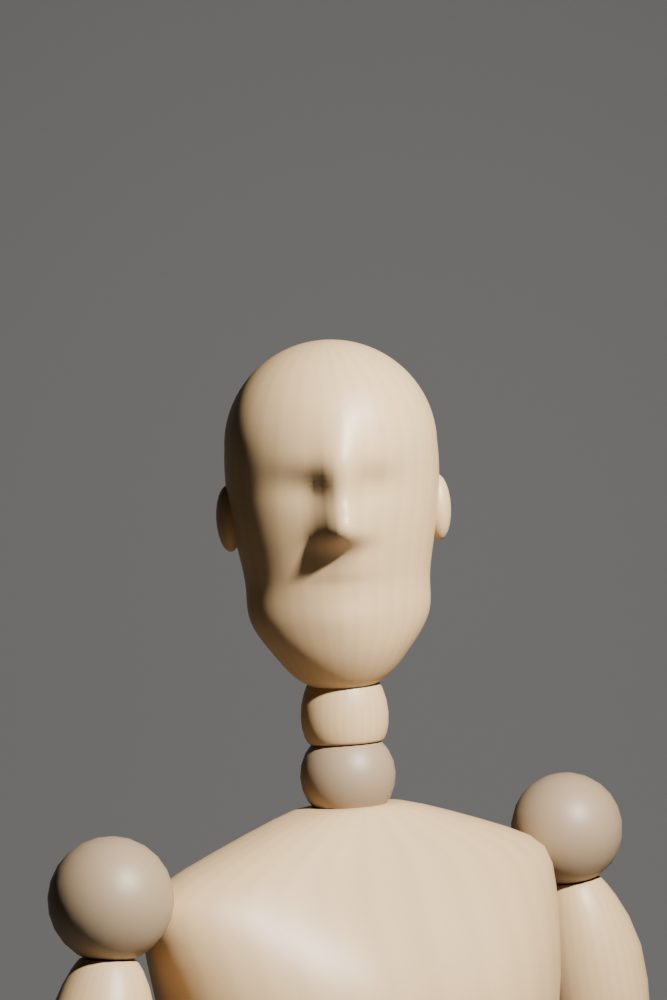 Loop30° to the side, a little high. The nose shadow points down toward the mouth corner.
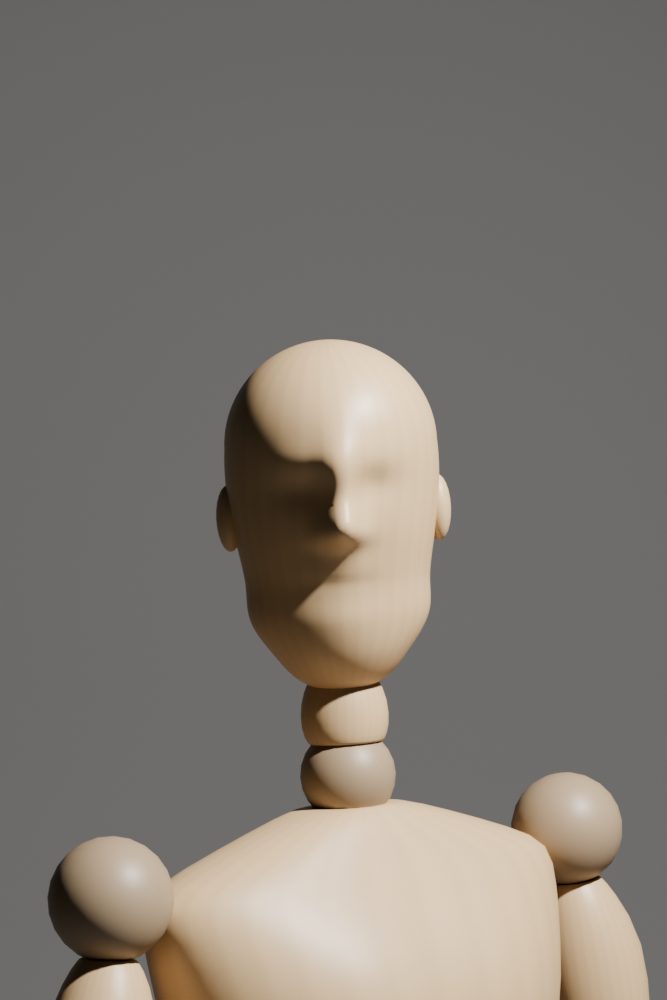 RembrandtFurther round and higher, until a small triangle of light sits on the far cheek.
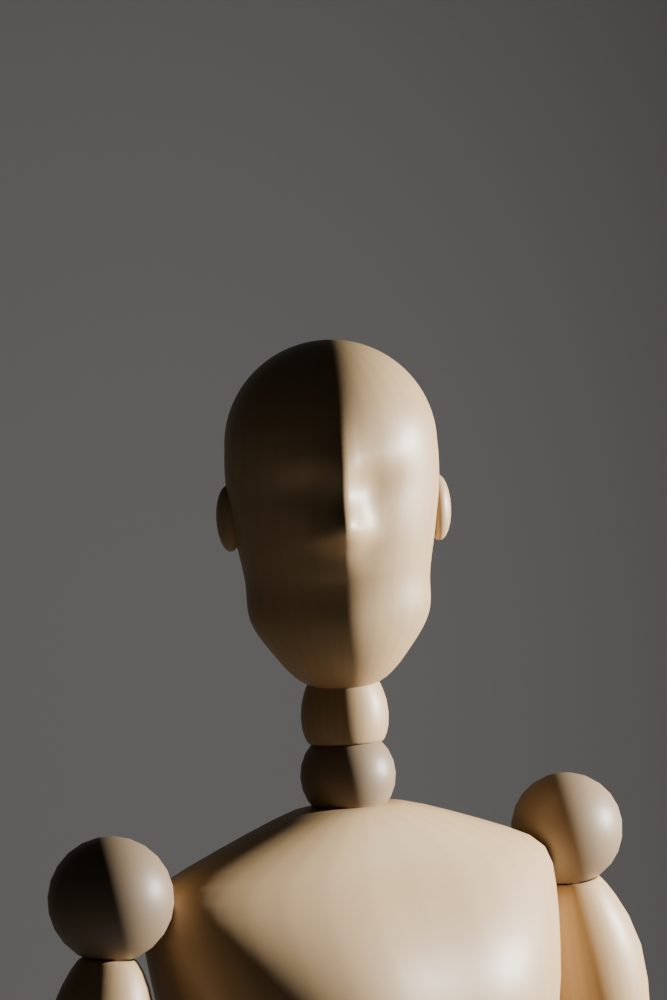 SplitAt 90°. Half the face lit, half in shadow.
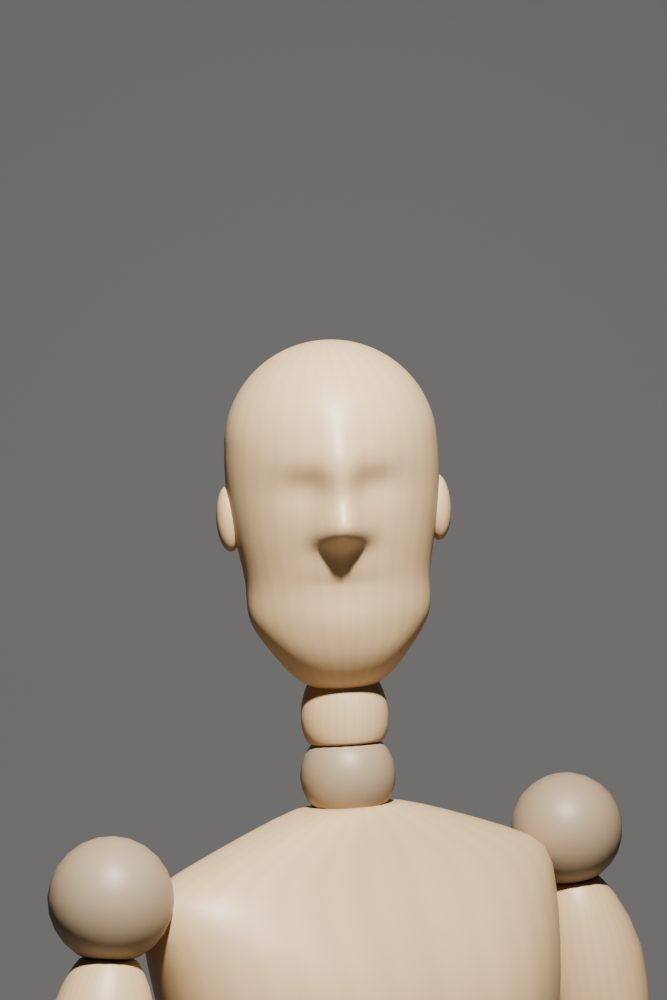 ButterflyStraight in front, high above the lens. A small shadow under the nose.
A second pair of eyes that never asks for the camera.
Your camera sends each frame
Built-in FTP transfer (Sony, Canon, Nikon, Fujifilm GFX and others), or any tether app's output folder. Your camera, your settings.
About a second later: the technical check
Focus at the AF point, clipping, tilted verticals, and the limits on your assignment card. Measured on your laptop, never uploaded.
A few seconds later: the next setup
A short note on what works and what to change, then the next pose, focal length, distance, height, angle and light, with a line to say. It shows on the mannequin on your phone.
After: the cull is done
Near-identical frames are grouped into bursts. The best of each is marked as the pick, and missed focus is marked as a reject. Written as XMP sidecars that Lightroom, Capture One, darktable and digiKam read.
A real live session, recorded off-screen on a phone-sized page. The "camera" frames are the AI-generated stills above, sent over FTP; the notes and next shots are what the coach (gpt-5.4-mini) actually wrote, 2–4 s per frame. Generated stills carry no camera EXIF, hence "no camera settings".
Works: The clean gray background and centered, steady hand-to-chin pose give a strong, controlled foundation for the lighting series.
Change: For the next frame, move the flash a little farther to the subject’s left and slightly higher, keep the camera locked, and shoot at 1/200, f/5.6, ISO 100 with the flash in manual; aim for a clearer loop shadow on the far cheek.
seen: hand_chin · medium · eye angle · light loop · score 7/10
Next: contrapposto, 85 mm at 1.8 m, camera 1.5 m, light loop.
Say: “Shift your weight to one leg and hold that chin pose.”
gpt-5.4-mini on the hand-to-chin still above, 2.6 s. Verbatim.
The next shot, shown on Pose Lab in a phone browser. Recorded off-screen.
Cloud, local, or none at all.
The technical check, bursts and cull run on your laptop with no model at all. The coach and the set-up reader are optional, and you choose where frames go.
| Backend | Where frames go | Tested |
|---|---|---|
| openai | Any OpenAI-compatible server: a local Ollama, LM Studio or vLLM keeps frames on your machine; OpenAI's API does not | Yes: gpt-5.4-mini, 3.7 s per frame |
| claude-cli | Anthropic, through the Claude Code CLI you're signed in to | Yes: Claude Haiku, about 20 s per frame |
| anthropic | Anthropic, through the API with your key | Not yet |
| off | Nowhere | Yes |
Cloud backends send every frame to that provider. If your subjects haven't agreed to that, run a local model or turn the coach off. The prompts tell models never to identify anyone or describe their identity, age or body.
Five minutes, then point your camera at it.
macOS or Linux, Python 3.11 or newer, and exiftool. Blender is optional and only needed for the photoreal previews. For agents, there's an MCP server: claude mcp add companion -- companion mcp.
The repository isn't public yet. These are the steps once it is.
git clone <repository link: going public soon>
cd shooting-companion
python3 -m venv .venv && source .venv/bin/activate
pip install -e '.[all]'
companion doctor
companion start --assignment H01
# open the printed address on your phone
| What we have checked | What we haven't |
|---|---|
| Tests pass on Python 3.11, 3.12 and 3.15. A camera frame reaches the phone page over FTP in 0.15 s on the laptop. MCP tools, Blender renders, and Pose Lab following the shared scene all work. Real Sony α7R V frames, sent over FTP from a computer. | A camera's own FTP transfer, on any body: support is from the makers' manuals. The Anthropic API backend. A local vision model. Windows. |